Basic Flight
Propulsion Arm / Cutoff
The propulsion arm / cutoff function can be understood as starting / stopping the propulsion. Once propulsion is cut off, all driver outputs are interrupted. The cutoff action takes effect immediately without any condition check, so it can also be used for a controlled crash in an emergency.
By default the propulsion arm / cutoff function is mapped to channel 7. Bind channel 7 to a knob switch on the remote controller and you can control propulsion arm / cutoff with the knob.
Lock and Unlock
For safety, the UAV must be unlocked before propulsion output is available. In the locked state, the multirotor propulsion, control surfaces and engine are all locked.
The UAV is locked by default at power-on and can be unlocked from the remote controller or the ground station.
Unlocking from the remote controller: move both sticks to the inner bottom corners to unlock;
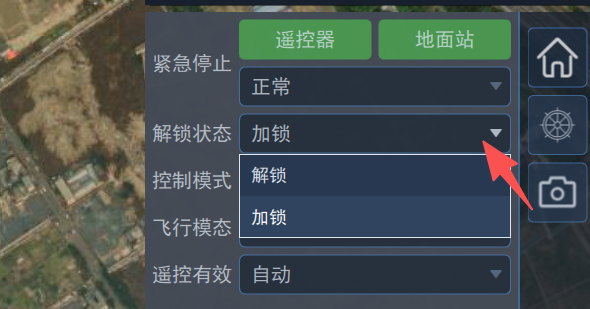
Unlocking from the ground station: select Unlock in the "Arming State" drop-down list, as shown below:
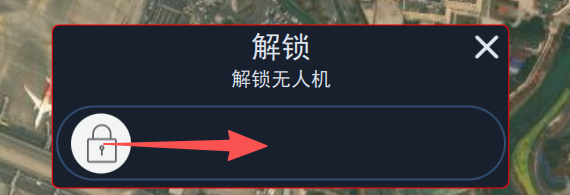
Then drag the slider to confirm the unlock operation, as shown below:
Flight Modes
A multirotor UAV has only the multirotor flight mode, a fixed-wing UAV has only the fixed-wing flight mode, while a VTOL UAV has both: multirotor mode and fixed-wing mode. There are several ways to switch between the two modes:
Switching from the remote controller: switch modes through remote controller channel 8. This is generally used for checks on the ground — switch to fixed-wing to check the control surfaces, switch to multirotor to check the motors;
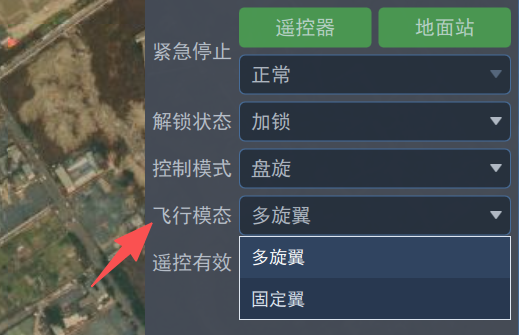
Switching from the ground station: select the flight mode from the "Rotor State" drop-down list, as shown below:
Automatic switching: switch modes through a planned mission, for example adding a "VTOL takeoff" waypoint to switch from multirotor to fixed-wing;
External control switching: switch by an external mode switch command. Note that this switching method requires an external computer.
Flight Mode Description
Classification
The UAV supports two major categories of flight modes: manual and automatic. In manual mode, flight commands are given by operating a control device (such as a remote controller); in automatic mode, the navigation flight control system generates the commands automatically.
Manual Modes
Manual modes include stabilized mode, altitude hold mode and position hold mode. Depending on the flight mode, the control quantity mapped to each remote controller stick differs.
In multirotor flight mode, the stick control quantities are described in the table below:
| Mode | Roll stick | Pitch stick | Throttle stick | Yaw stick | Center response |
|---|---|---|---|---|---|
| Stabilized | Roll angle | Pitch angle | Throttle | Yaw rate | Keep attitude level |
| Altitude | Roll angle | Pitch angle | Vertical speed | Yaw rate | Hold current altitude |
| Position | Left/right speed | Forward/backward speed | Vertical speed | Yaw rate | Hold current position and heading |
In fixed-wing flight mode, the stick control quantities are described in the table below.
| Mode | Roll stick | Pitch stick | Throttle stick | Yaw stick | Center response |
|---|---|---|---|---|---|
| Stabilized | Roll angle | Pitch angle | Throttle | Yaw rate | Keep attitude level |
| Altitude | Roll angle | Pitch angle | Airspeed | Yaw rate | Hold current yaw angle and hold altitude |
| Position | Roll angle | Pitch angle | Airspeed | Yaw rate | Keep a straight trajectory and hold altitude |
These manual modes can be switched through remote controller channel 5, or by sending the corresponding mode command from the control panel on the right of the ground station.
Automatic Modes
The automatic modes are as follows:
Hover mode: in multirotor mode the UAV hovers at its current position; in fixed-wing mode the UAV circles around a point;
Mission mode: the UAV flies along the path and performs specified actions at waypoints. The path must be planned in the ground station and uploaded to the UAV, otherwise this mode cannot be entered;
Return mode: the UAV returns according to the return settings, for example returning to the takeoff point, to an alternate landing point, or to a moving platform;
Orbit mode: set the orbit point and direction and the UAV flies around that point.
The corresponding mode commands can be sent from the control panel on the right of the ground station.