
Contributing Code
This section assumes you have a basic knowledge of Git and GitHub, can use Git as a version control tool, and are familiar with the GitHub collaborative development workflow.
To contribute code, you first need a GitHub account to take part in the development of the nextpilot-flight-control project.
Code Style
nextpilot-flight-control.code-workspace is a VS Code workspace file with the following formatting tools configured; they trigger automatically when you save a file:
clang-format(ClangFormat) formats C/C++ code. The .clang-format file at the repository root defines the formatting options; see the ClangFormat style options reference for their meaning.blackformats Python codeDavidAnson.vscode-markdownlintformats Markdowntamasfe.even-better-tomlformats TOMLredhat.vscode-yamlformats YAML
If you do not want the code under a certain folder to be formatted, add a .clang-format file to that folder with the following content:
---
Language: Cpp
DisableFormat: true
---C/C++
NextPilot follows the Google C++ Style Guide (Chinese translation) with minor adjustments as described below.
File Extensions
- *.hpp, C++ header file
- *.h, C header file
- *.cpp, C++ file
- *.c, C code
File Names
File names should be all lowercase and may contain underscores (_) or hyphens (-), following the project convention. If there is no convention, _ is preferred.
Type Names
The first letter of every word in a type name is capitalized, with no underscores: MyExcitingClass, MyExcitingEnum.
All type names — classes, structs, type definitions (typedef), enums, template type parameters and so on — use the same convention: start with a capital letter, capitalize the first letter of each word, and use no underscores. For example:
// classes and structs
class UrlTable { ...
class UrlTableTester { ...
struct UrlTableProperties { ...

// type definitions
typedef hash_map<UrlTableProperties *, string> PropertiesMap;

// using alias
using PropertiesMap = hash_map<UrlTableProperties *, string>;

// enums
enum UrlTableErrors { ...Python
Use black for automatic formatting.
Branching Model
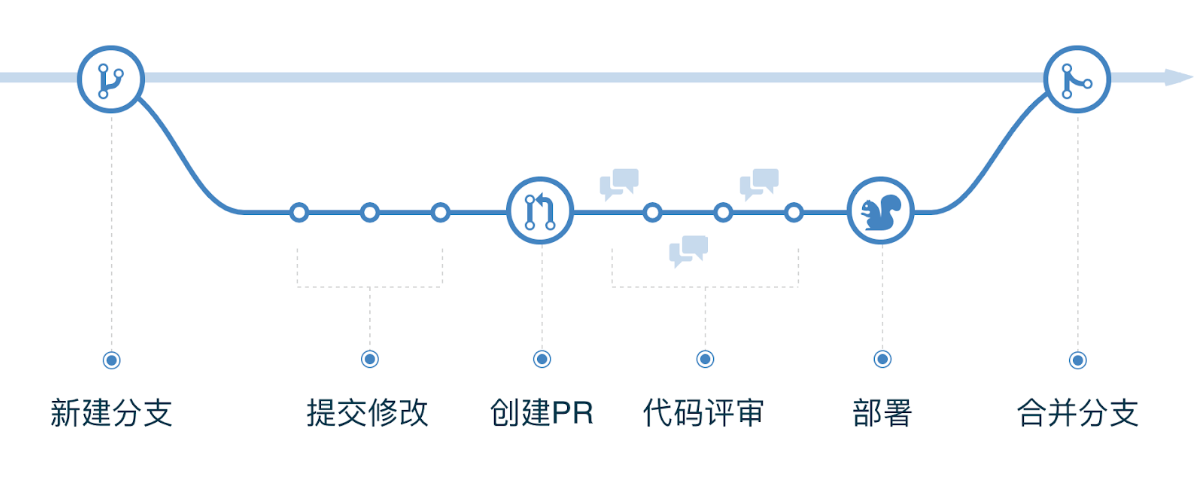
NextPilot iterates through GitHub Flow, which has only one long-lived branch, master, so it is very simple to use.
Step 1: Branch off master as needed — there is no distinction between feature branches and patch branches.
Step 2: When development on the new branch is complete, or when you need discussion, open a pull request (PR) against master.
Step 3: A Pull Request is both a notification that draws attention to your request and a conversation mechanism where everyone reviews and discusses your code. You can keep committing code during the discussion.
Step 4: Once your Pull Request is accepted and merged into master, and redeployed, the branch you created is deleted.
Commit Conventions
Whenever we commit code with Git, we need to write a Commit Message. A clear, concise and standardized Commit Message makes later code review, information lookup and version rollback more efficient and reliable, so it is necessary to require developers to write compliant commit messages.
The NextPilot commit message convention follows the Angular Team Commit Specification and mainly includes:
- type (required): the category of the commit, such as feat, fix, etc.
- scope (optional): the scope affected by the commit
- subject (required): the subject of the commit, generally within 50 characters
- body (optional): a detailed description of the commit
- footer (optional): a link to the issue or task the commit addresses
- sign off (required): Sign-Off means appending author information at the end of the
commit message
<type>(<scope>): <subject>

<body> detailed description of the commit

<footer> link to the corresponding issue or task

<sign-off> signatureThe following is a standard Commit Message:
Commit: 37515b80fa150e1ef315824e63098231d4af4031
Parents: eb15ff286ba204ebf1eb6b79915a8a9b806cf869
Author: latercomer <latercomer@qq.com>
Committer: latercomer <latercomer@qq.com>
Date: Thu Sep 26 2024 15:42:49 GMT+0800 (China Standard Time)

✨feat(mc_att_control): add hover thrust throttle estimator

add hover thrust throttle estimator to mc_att_control, set param MC_HOVER_THROTTL_METHOD select estimator method

https://github.com/nextpilot/nextpilot-flight-control/issues/110

Signed-off-by: latercomer <latercomer@qq.com>Setting Up Sign-Off
When committing with git commit on the command line, the -s option automatically appends the Sign-Off information at the end of the commit message:
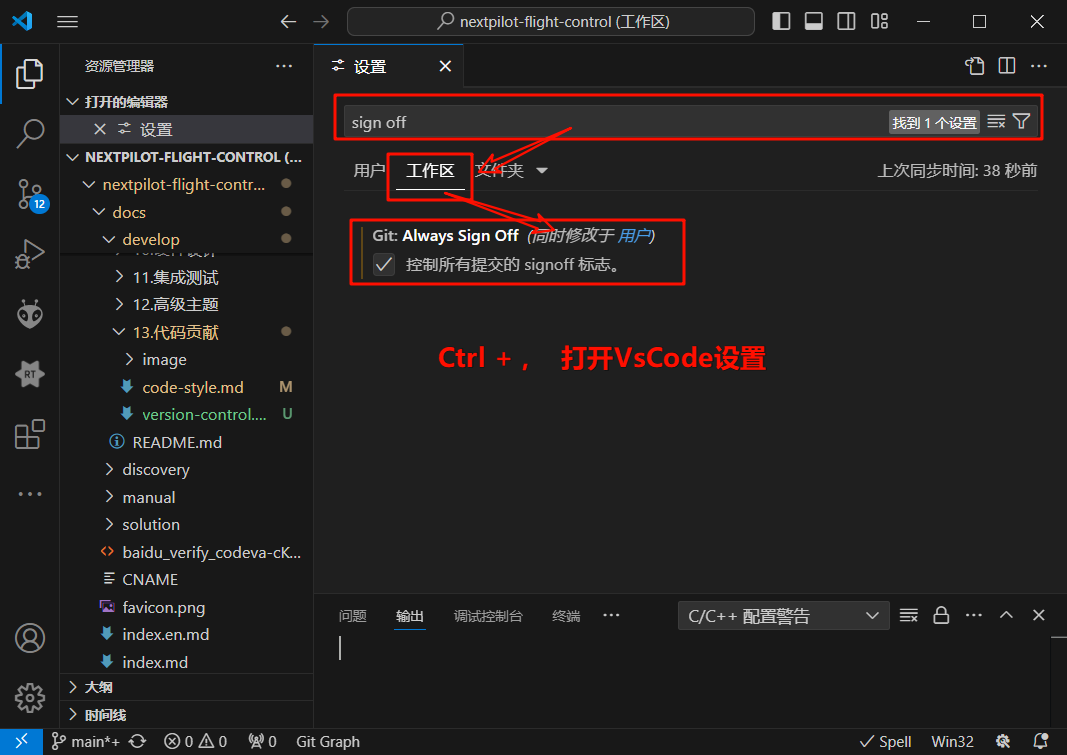
git commit -m "your commit message" -sIn VS Code, press ctrl + , to open the settings page, search for sign off, and check Always Sign Off.
VS Code Helper Plugin
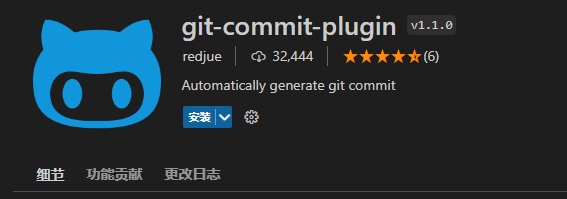
Search for the git-commit-plugin extension in the VS Code marketplace and install it:
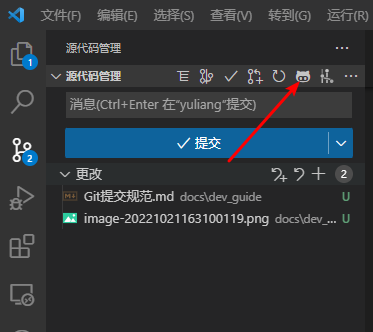
After installation, on the VS Code sidebar Source Control page, click the icon shown below:
Once the plugin is activated, select a commit type, for example 🐞fix for a bug fix. The available commit types are:
- 🎉init: project initialization
- ✨feat: add a new feature
- 🐞fix: fix a bug, for when a single commit directly resolves the issue
- 📃docs: add or modify documentation
- 🌈style: formatting changes (no effect on code behavior)
- 🦄refactor: refactoring (neither a new feature nor a bug fix)
- 🎈perf: optimization, such as improving performance or experience
- 🧪test: add tests
- 🔧build: changes to the build process or auxiliary tools
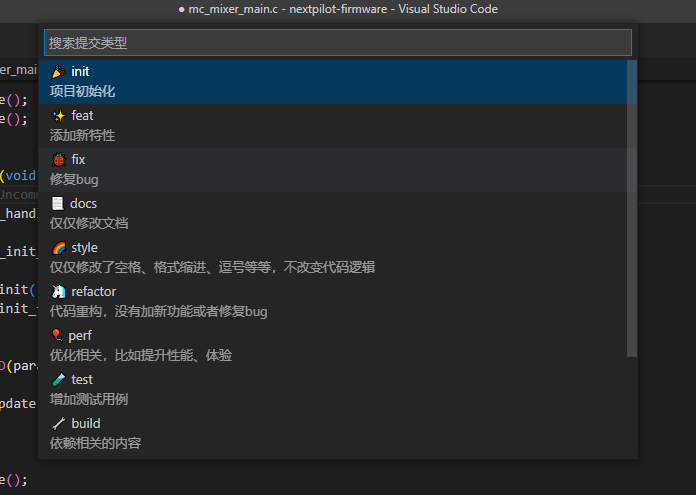
You can then fill in Scope, Subject, Body and Footer as needed, or choose Complete to finish the commit. The ESC key cancels the current commit.
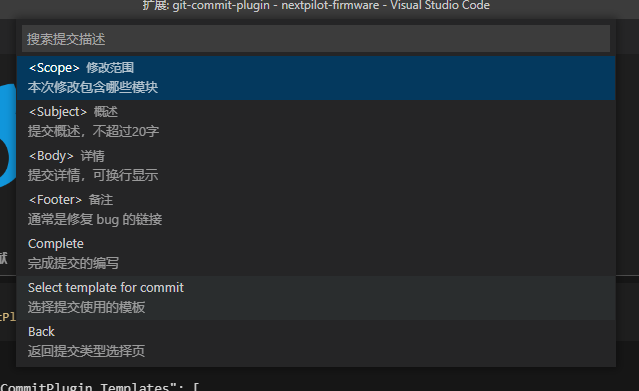
- Scope (optional): describes the scope affected by this commit, such as the data layer, control layer or view layer; it varies by project.
- Subject (required): a short description of the commit, generally no more than 50 characters.
- Body (optional): a detailed description of the commit; may span multiple lines.
- Footer (optional): if this commit addresses a specific issue, you can close that issue in the Footer.